
library(tidyverse)
# Use nicer DuckDB Connections Pane features
# options("duckdb.enable_rstudio_connection_pane" = TRUE)
# Connect to a database
db_file <- "my_fancy_database.duckdb"
con <- connections::connection_open(duckdb::duckdb(), db_file)
# Add stuff to it
copy_to(
con,
gapminder::gapminder,
name = "gapminder",
overwrite = TRUE,
temporary = FALSE
)
# Get stuff out of it
gapminder_2007 <- tbl(con, I("gapminder")) |>
filter(year == 2007) |>
collect()
# All done
connections::connection_close(con)On January 13, 2026, I was on Posit’s Data Science Lab to talk about my Positron settings and other neat workflow-y things I use to make my life easier.
This isn’t a standard blog post—it’s mostly just a list of the stuff we talked about, with lots of different links to other resources.
Positron stuff
Favorite Positron extensions:
My custom Positron settings (these all live in settings.json):
Click to expand
{
    // Editor settings
    // -------------------------------------------------------------------------
    // Fonts
    // Use GitHub's Monaspace (https://github.com/githubnext/monaspace) and enable ligatures
    "editor.fontFamily": "'Monaspace Argon Var'",
    "editor.fontSize": 12.5,
    "editor.fontLigatures": "'ss01', 'ss02', 'ss03', 'ss04', 'ss05', 'ss06', 'ss07', 'ss08', 'calt', 'dlig', 'liga'",

    // Highlight modified/unsaved tabs
    "workbench.editor.highlightModifiedTabs": true,

    // Add some rulers
    "editor.rulers": [
        80,
        100
    ],

    // Indent with two spaces, but only for R
    "[r]": {
        "editor.tabSize": 2,
        "editor.formatOnPaste": false,
    },
    "[quarto]": {
        "editor.tabSize": 2,
        "editor.defaultFormatter": "quarto.quarto"
    },

    // Nicer handling of end-of-document newlines, via
    // https://rfdonnelly.github.io/posts/sane-vscode-whitespace-settings/
    "files.insertFinalNewline": true,
    "editor.renderFinalNewline": "dimmed",
    "editor.renderWhitespace": "trailing",
    "files.trimFinalNewlines": true,

    // General editor settings
    "editor.detectIndentation": false,
    "editor.showFoldingControls": "always",
    "window.newWindowDimensions": "inherit",
    "editor.scrollBeyondLastLine": false,
    "window.title": "${activeEditorFull}${separator}${rootName}",
    "editor.tabSize": 4,
    "editor.wordWrap": "on",
    "editor.multiCursorModifier": "ctrlCmd",
    "editor.snippetSuggestions": "top",

    // Hide things from the file panel
    "files.exclude": {
        "**/.Rhistory": true,
        "**/.Rproj": true,
        "**/.Rproj.user": true,
        "**/renv/library": true,
        "**/renv/local": true,
        "**/renv/staging": true
        // "**/_freeze": true,
        // "**/.quarto/**": true
    },
    // Hide things from the global search menu and watcher
    "files.watcherExclude": {
        "**/.Rproj/*": true,
        "**/.venv/*": true,
        "**/renv/library": true,
        "**/renv/local": true,
        "**/renv/staging": true,
        "*/_freeze/*": true,
        "*/.quarto": true
    },

    // Sign git commits
    "git.enableCommitSigning": true,


    // Extension-specific settings
    // -------------------------------------------------------------------------
    // Markdown linting settings (idk if this stuff even works with Quarto though)
    "markdownlint.config": {
        "default": true,
        "MD012": { "maximum": 2 },
        "MD025": false,
        "MD041": false
    },

    // Wrap at 80 columns with the "Rewrap" extension
    "rewrap.wrappingColumn": 80,

    // Don't phone home for the "YAML" extension
    "redhat.telemetry.enabled": false,

    // Positron things
    "git.confirmSync": false,
    "git.suggestSmartCommit": false,
    "positron.r.quietMode": true,
    "better-comments.highlightPlainText": true,
    "workbench.startupEditor": "newUntitledFile",
    "workbench.editor.empty.hint": "hidden",
    "remote.autoForwardPortsSource": "hybrid",
    "projectManager.tags": [
        "Personal",
        "Research",
        "Teaching"
    ],
    "window.confirmBeforeClose": "keyboardOnly",
    "plots.darkFilter": "off",
    "workbench.keybindings.rstudioKeybindings": true,
    "positron.assistant.enable": true,
    "dataExplorer.summaryCollapsed": true,
    "editor.defaultFormatter": "Posit.air-vscode",
    "python.locator": "js",
    "python.enableAutoReload": false,
    "workbench.editor.pinnedTabsOnSeparateRow": true,
    "positron.assistant.inlineCompletions.enable": {
        "*": false
    },
    "inlineChat.lineNaturalLanguageHint": false,

    // Miscellaneous settings
    "latex-workshop.view.pdf.color.dark.backgroundColor": "#272822",
    "latex-workshop.latex.autoBuild.run": "never",

    "files.associations": {
        "renv.lock": "json"
    },
    "editor.guides.bracketPairs": "active",
    "diffEditor.ignoreTrimWhitespace": false,
    "terminal.integrated.commandsToSkipShell": [
        "language-julia.interrupt"
    ],
    "githubPullRequests.createOnPublishBranch": "never",

    "projectManager.openInNewWindowWhenClickingInStatusBar": true,
    "[dockercompose]": {
        "editor.insertSpaces": true,
        "editor.tabSize": 2,
        "editor.autoIndent": "advanced",
        "editor.quickSuggestions": {
            "other": true,
            "comments": false,
            "strings": true
        },
        "editor.defaultFormatter": "redhat.vscode-yaml"
    },
    "[github-actions-workflow]": {
        "editor.defaultFormatter": "redhat.vscode-yaml"
    },
    "[yaml]": {
        "editor.defaultColorDecorators": "auto"
    },
    "markdownTablePrettify.extendedLanguages": [
        "quarto"
    ],
    "editor.copyWithSyntaxHighlighting": false,
    "workbench.settings.showAISearchToggle": false,
    "workbench.preferredDarkColorTheme": "Monokai",
    "workbench.colorTheme": "Monokai",
    // "workbench.colorTheme": "Monokai Pro (Filter Spectrum)",
    // Override the terminal background color to match the editor background
    "workbench.colorCustomizations": {
        "[Monokai Pro (Filter Spectrum)]": {
            "terminal.background": "#222222",
            "panel.background": "#222222"
        },
        "[Monokai Classic]": {
            "terminal.background": "#272822",
            "panel.background": "#272822"
        }
    },
    "workbench.iconTheme": "material-icon-theme",
    "workbench.productIconTheme": "fluent-icons",
    "pastum.defaultConvention": "snake_case",
    "git.autofetch": true,
    "window.newWindowProfile": "Default",
    "terminal.integrated.detectLocale": "on",
    "claudeCode.preferredLocation": "panel",
    "material-icon-theme.folders.associations": {
        "renv": "Packages",
        "_freeze": "Archive",
        "_targets": "Components",
        "resource": ""
    },
    "spellright.language": [
        "en"
    ],
    "spellright.documentTypes": [
        "markdown",
        "latex",
        "quarto"
    ],
    "workbench.activityBar.location": "top"
}
My Positron keyboard shortcuts (these all live in keybindings.json):
Click to expand
[
    {
        "key": "shift+cmd+d",
        "command": "editor.action.copyLinesDownAction",
        "when": "editorFocus"
    },
    {
        "key": "ctrl+alt+`",
        "command": "workbench.action.terminal.new",
        "when": "terminalProcessSupported || terminalWebExtensionContributedProfile"
    },
    {
        "key": "ctrl+shift+`",
        "command": "-workbench.action.terminal.new",
        "when": "terminalProcessSupported || terminalWebExtensionContributedProfile"
    },
    {
        "key": "ctrl+shift+`",
        "command": "workbench.action.terminal.toggleTerminal",
        "when": "terminal.active"
    },
    {
        "key": "ctrl+`",
        "command": "-workbench.action.terminal.toggleTerminal",
        "when": "terminal.active"
    },
    {
        "key": "shift+cmd+c",
        "command": "-editor.action.commentLine",
        "when": "config.rstudio.keymap.enable && editorTextFocus"
    },
    {
        "key": "alt+cmd+q",
        "command": "rewrap.rewrapComment",
        "when": "editorTextFocus"
    },
    {
        "key": "alt+q",
        "command": "-rewrap.rewrapComment",
        "when": "editorTextFocus"
    },
    {
        "key": "cmd+d",
        "command": "-editor.action.deleteLines",
        "when": "editorTextFocus"
    },
    {
        "key": "cmd+. cmd+r",
        "command": "r.createNewFile"
    },
    // create reprex from selection
    {
        "key": "cmd+. cmd+shift+r",
        "command": "workbench.action.executeCode.console",
        "when": "editorTextFocus",
        "args": {
            "langId": "r",
            "code": "reprex::reprex_selection()",
            "focus": false
        }
    },
    {
        "key": "shift+alt+cmd+l",
        "command": "editor.action.insertCursorAtEndOfEachLineSelected",
        "when": "editorTextFocus"
    },
    {
        "key": "shift+alt+i",
        "command": "-editor.action.insertCursorAtEndOfEachLineSelected",
        "when": "editorTextFocus"
    },
    // Keybindings inspired by Emil Hvitfeldt
    // https://emilhvitfeldt.com/post/positron-key-bindings/
    {
        "key": "cmd+. cmd+1",
        "command": "workbench.action.focusActiveEditorGroup"
    },
    {
        "key": "cmd+. cmd+2",
        "command": "workbench.action.positronConsole.focusConsole"
    },
    {
        "key": "cmd+. cmd+shift+v",
        "command": "workbench.action.positronConsole.clearConsole"
    },
    {
        "key": "cmd+. cmd+3",
        "command": "workbench.action.terminal.focus"
    },
    // {
    //     "key": "cmd+. cmd+shift+b",
    //     "command": "workbench.action.terminal.clear"
    // },
    {   // Restart terminal
        "key": "cmd+shift+9",
        "command": "runCommands",
        "args": {
            "commands": [
                "workbench.action.terminal.kill",
                "workbench.action.terminal.new"
            ]
        }
    },
    // My stuff again ↓
    {
        "key": "cmd+. cmd+q",
        "command": "quarto.newDocument"
    },
    {
        "key": "shift+cmd+n",
        "command": "-r.createNewFile"
    },
    {
        "key": "cmd+. cmd+m",
        "command": "workbench.action.files.newUntitledFile",
        "args": { "languageId": "markdown" }
    },
    {
        "key": "ctrl+shift+k",
        "command": "editor.action.deleteLines",
        "when": "editorTextFocus"
    },
    {
        "key": "shift+alt+cmd+ctrl+t",
        "command": "workbench.action.tasks.runTask",
        "args": "Open in Typora"
    },
    {
        "key": "cmd+alt+shift+i",
        "command": "editor.action.insertSnippet",
        "when": "editorTextFocus && editorLangId == quarto",
        "args": {
            "snippet": "```\n\n\n\n$0```{r}"
        }
    },
]
Positron connections pane
Real life use cases:
- Mirror of a relational database of Idaho’s election results for testing and local development. It’s a core part of the DIY Election Desk project that I presented about at posit::conf(2025) (see code here)
- Taking a massive 10 GB zipped CSV file and putting it in a DuckDB database and accessing it through {dbplyr} (see code here)
Example with DuckDB and {connections}; the same general process works with any other database backend, like SQLite, MySQL, Spark, PostgreSQL, etc.:
Workflow tips and tricks
General things I use
macOS Quick Actions
Open a folder in Positron from macOS Finder with Quick Actions
Raycast
Download Raycast (both macOS and Windows)
Helpful resources:
- Raycast on YouTube: Raycast has a big YouTube presence and there are a lot of resources out there about it
- 101 Things You Can Do With Raycast
- Getting Started with Raycast for Windows
My setup:
My custom Raycast scripts (neat things like getting a random.org seed, toggling a webcam light)
-
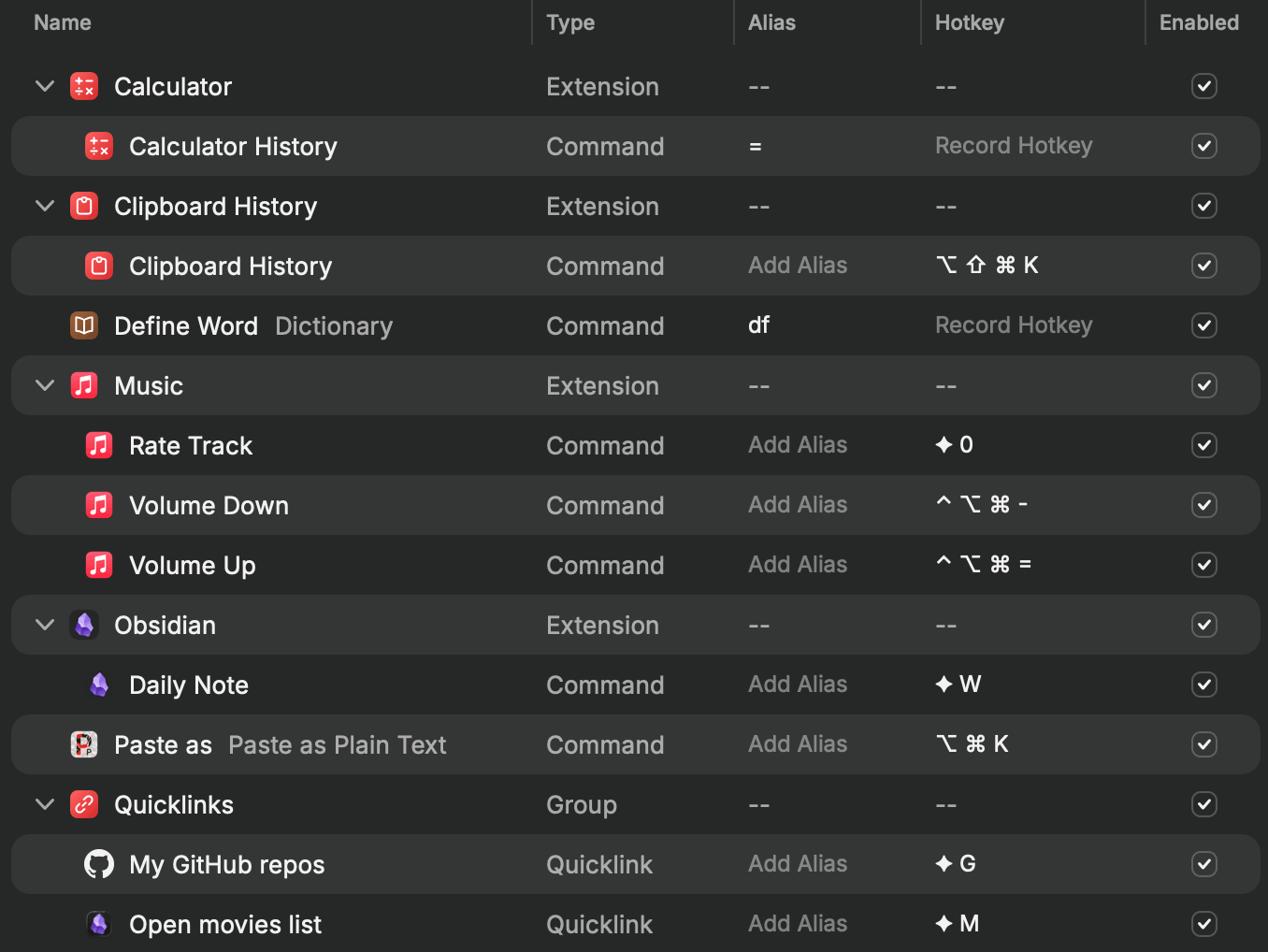
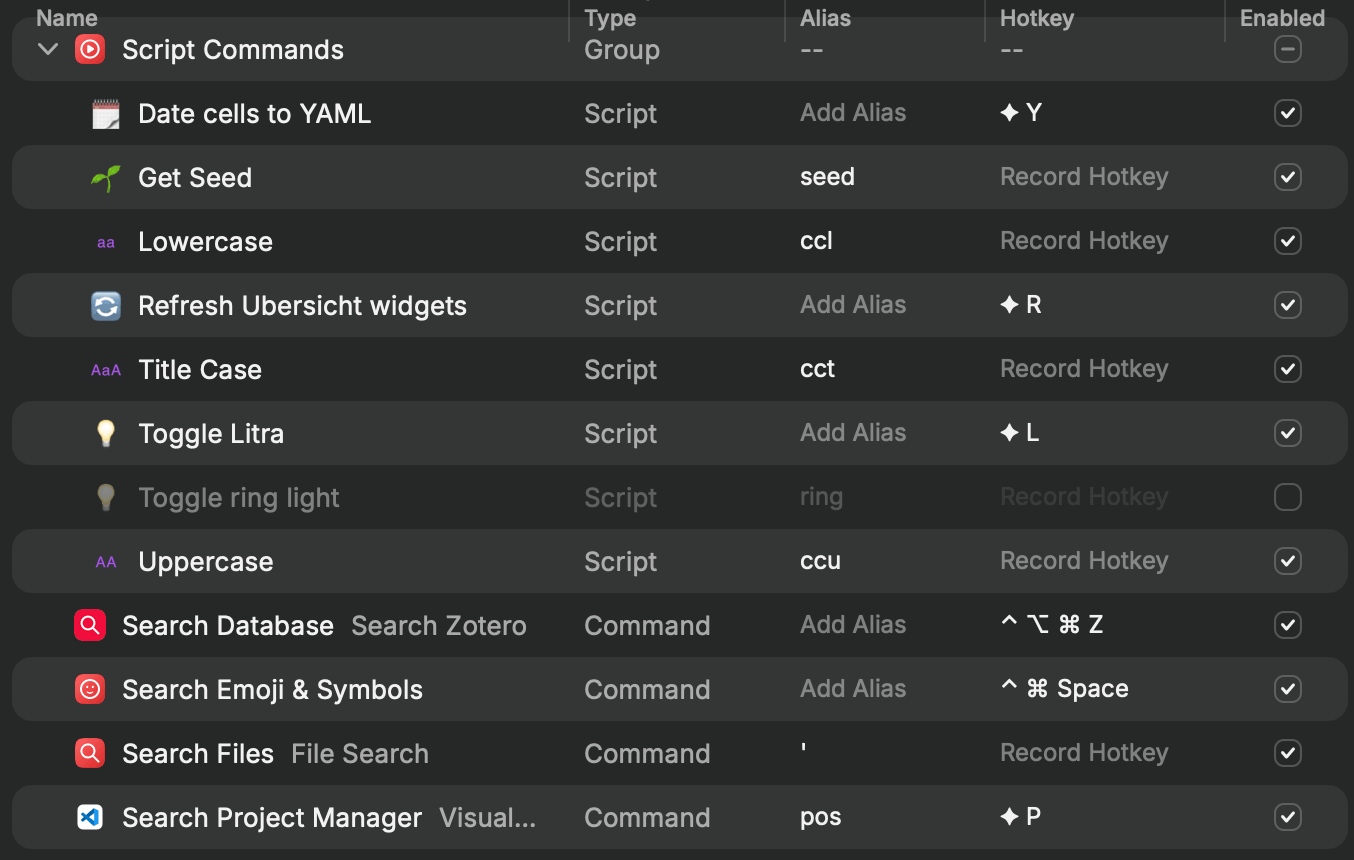
My extension settings (there’s no easy way to share these details other than screenshots 🤷♂️). The ◆ symbol here stands for ⌘⌥^⇧ (or mashing the whole corner of my keyboard).
-
Custom quicklinks:
- Search my repositories on Github
https://github.com/search?q=user%3Aandrewheiss%20{argument name="Search"}&type=code
- Open my “Movies to watch” note in Obsidian
obsidian://open?path=%2FUsers%2Fandrew%2FObsidian%2FNotes%2F%E2%80%A2%20Goals%2FMovies%20to%20watch.md
- Search my repositories on Github
-
Other neat features:
- Upcoming calendar events in the menubar
- Clipboard history
- Emoji picker
- Color picker
Espanso
Download Espanso (macOS, Windows, and Linux)
Some things I do with it:
-
Typographic things like:
-
;commfor ⌘,;shiftfor ⇧,;optfor ⌥ -
;timesfor a true multiplication sign ×,;minusfor a true subtraction sign − -
;prime1and;prime2for ′ and ″ (like 5′ 11″)
-
-
…and date things like:
-
;dtfor “2026-01-13” -
;dzfor “2026-01-13T11:06” -
;dmfor “2026-01-13 11:06:05” -
;datefor “January 13, 2026”
-
-
…and longer words with repeated letters that I always mess up, like these:
-
insttnfor “institution” -
consttalfor “constitutional” -
entrepalfor “entrepreneurial”
-
-
…and code snippets like
;dplyrsumfor inserting this R code to disable {dplyr}’s grouping messages:options(dplyr.summarise.inform = FALSE) -
…or running a {targets} pipeline with
;tarm:targets::tar_make() -
…or adding Quarto chunk metadata like disabling warnings and messages with
;wm:#| warning: false #| message: false -
…and adding figure dimensions with
;figwor;figh:#| fig-width: #| fig-height: -
…and lots of other Quarto things like panel tabsets (
;;pan), slideshow columns (;;col), includes (;;include), conditional content (;;visible), callouts (;;call), etc.: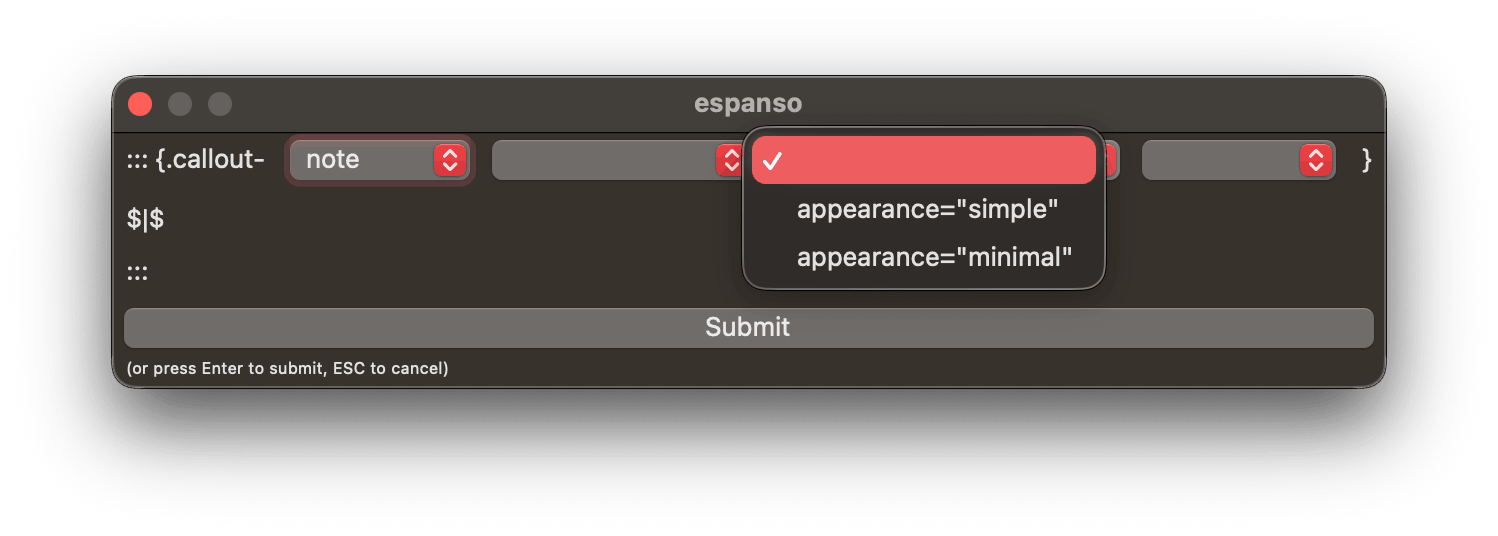
-
…and creating boilerplate Quarto YAML front matter with
;;qmd: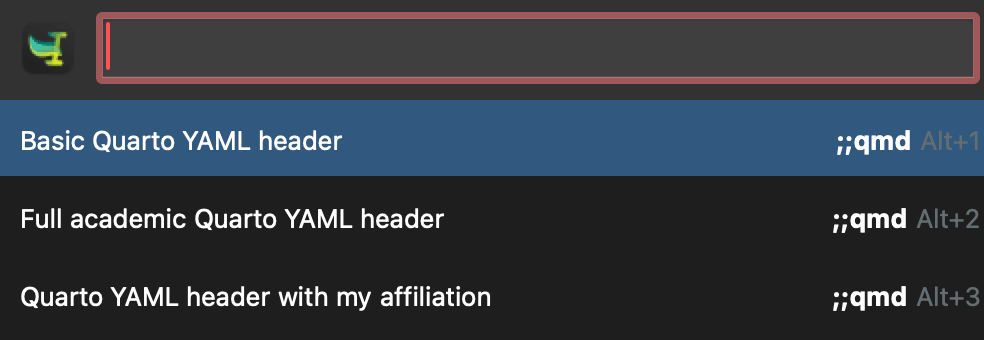
Citation
BibTeX citation:
@online{heiss2026,
  author = {Heiss, Andrew},
  title = {How to Make Your Data Analysis Life Easier Using {Positron,}
    {Raycast,} and {Espanso}},
  date = {2026-01-13},
  url = {https://www.andrewheiss.com/blog/2026/01/13/dsl-positron-workflow/},
  doi = {10.59350/zj8p7-7kg49},
  langid = {en}
}
For attribution, please cite this work as:
Heiss, Andrew. 2026. “How to Make Your Data Analysis Life Easier
Using Positron, Raycast, and Espanso.” January 13, 2026. https://doi.org/10.59350/zj8p7-7kg49.